Swift Ops logoSwift OpsWork instructions from video
Improve

Find improvements in the work you record.

Review process and changeover videos to spot waiting, extra motion, and sequence changes. Document the proposed method and send approved changes to Control for review and release.

Improve is a paid add-on to Capture, or included in Complete. The free trial covers Capture.

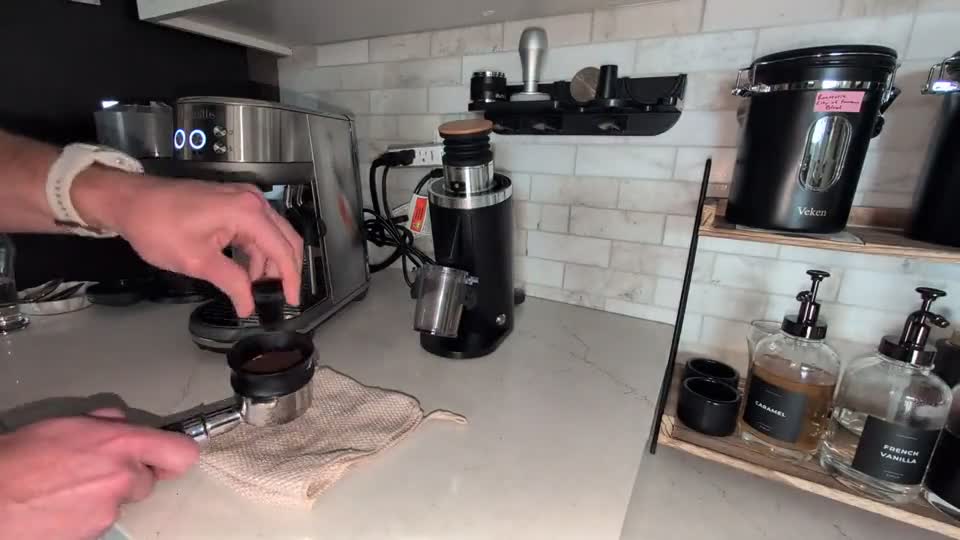
Espresso preparation source frame: distributing coffee grounds

Espresso preparation

Source
25-second recording
Output
Tool placement
Status
Proposal to test
Review the actual example ↓
Actual espresso output

Review an improvement to test.

One 25-second preparation recording, a nine-step baseline, and a concrete review task. Open the example below to see how the output supports a decision.

Source frame at 00:10: using the needle distribution tool on the espresso grounds
Source evidence · Espresso preparation · 00:10
The examples below may refer to other points in the recording.
Observation · 00:08–00:18

Countertop tool holder for WDT

Frequent reaching back and forth to the wall rack for individual puck prep tools (WDT tool, leveler, tamper).

Review the proposal and next action

Place WDT stand immediately adjacent to the tamping mat to eliminate reach to the wall mount.

Expected benefit

Reduces hand travel distance.

Example only. No decision is saved.

Generated from a 25-second espresso preparation clip. The tool-placement change is a proposal to test; time savings have not been measured. WDT is the needle tool used to distribute coffee grounds.

The separate complete espresso walkthrough shows the older 15-step example.

From observation to improvement

Turn observations into a proposed method.

Keep the video, timing notes, proposed changes, and reasons for each change together. Review and test the method before updating the approved instruction.

P

Observe

Record the setup or process, including movement, waiting, tools, and checks.

S

Compare

Compare the observed sequence with the current method and identify steps to change or test.

T

Document

Prepare a proposed sequence with source video, timing notes, and reasons for the changes.

Improve workflow

Use video before changing the instruction.

Review the current process and proposed changes using the source video. Submit an approved proposal to Control when it is ready for document review.

1
Select baseline

Start from the current method.

Choose the released work instruction, work instruction, or known current-state process.

2
Add evidence

Add the video you want to study.

Use changeover clips, operator recordings, setup footage, or screen recordings where the waste appears.

3
Review candidate

Describe the proposed method.

Capture the proposed change, expected benefit, affected steps, and risk before release.

4
Send for document review

Create the revision candidate.

Approved improvement findings can feed Control with source evidence and change rationale intact.

Improvement records

Make the change traceable before it becomes policy.

RecordWhy it mattersNext action
Current-state videoShows what actually happened before the improvement.Compare
Proposed methodDefines what should change and why.Review
Change rationaleGives document owners the reason behind the revision.Route
Affected recordsShows downstream work instructions and training records that may need review.Approve

Use evidence before the next process change.

Bring a changeover or process video. See how to review the sequence, document proposed changes, and prepare a revision for approval.